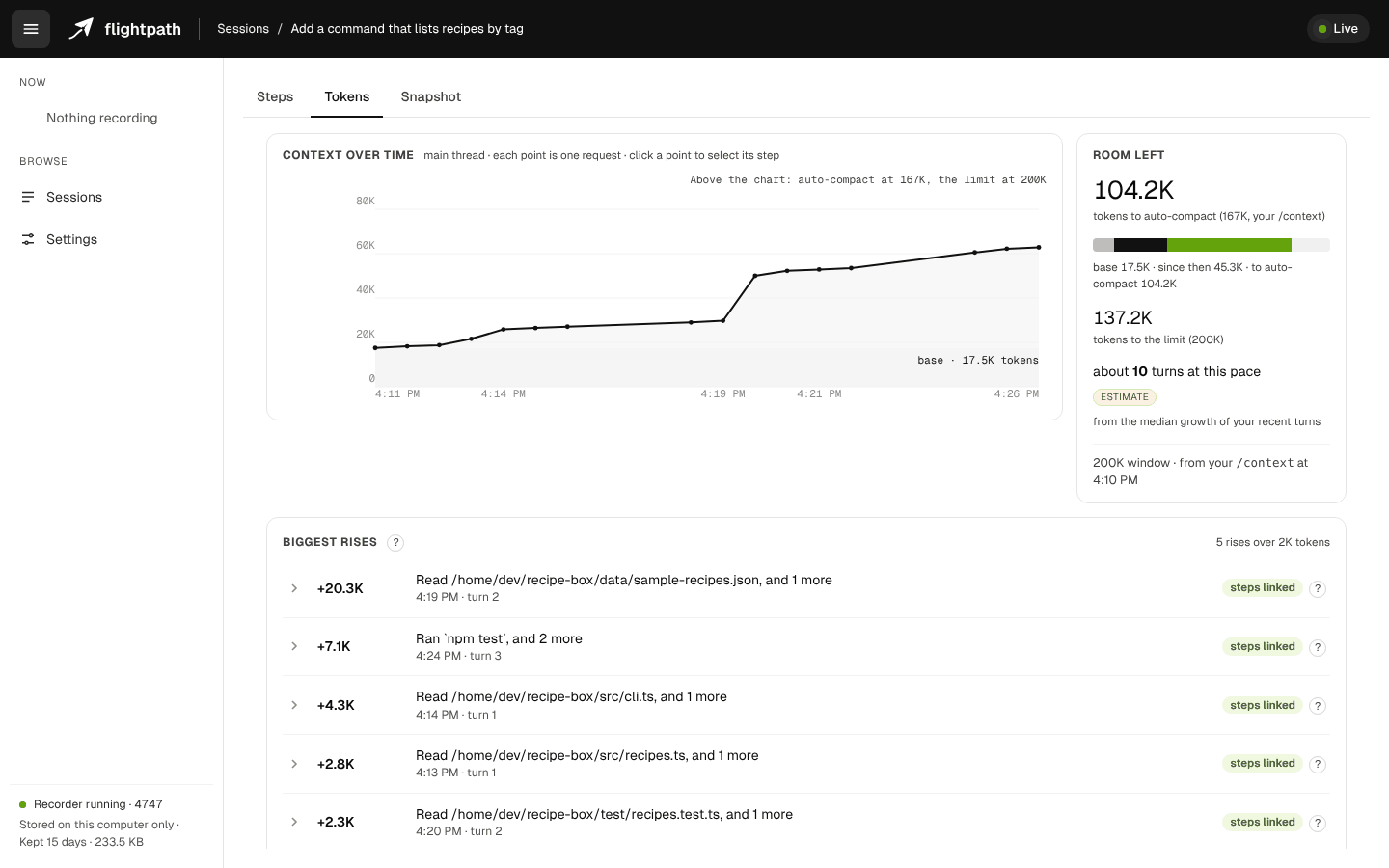
You type a one-line prompt. Claude Code answers it with tens of thousands of tokens of context behind it. Most developers know that in the abstract; very few have watched it happen step by step.
We have, because we built a tool to show it. This guide walks through what fills Claude Code's context, what makes it jump, and the habits that keep it lean. Everything here applies whether or not you use our tool. Where it helps, we'll show what one real session looked like through it.
What Claude Code sends on every request
Claude Code is stateless between requests in one important way: each request carries the whole working context again. A lot of that is the same every time:
- The system prompt. Claude Code's own instructions.
- Tool definitions. Every built-in tool and every tool from each connected MCP server, with its description and parameters.
- Your instruction files. Every CLAUDE.md that applies to the folder you're in.
- The skills listing. The name and description of every skill available to Claude, so it knows what it could load.
- The conversation so far. Your prompts, Claude's replies, and every tool result that hasn't been compacted away.
The first four are a fixed cost: you pay them before Claude does any work. The fifth grows with every step.
To see Claude Code's own breakdown at any moment, run /context. One thing to know: its report goes into the conversation, about 9K tokens, so use it when you need it, not after every turn.
What one session looked like
We ran a short session on a small sample project with a fresh Claude Code setup, and recorded it with Flightpath. We gave the project a long CLAUDE.md and more skills than it needed, to see what would show up. Then we worked normally for seven minutes: a project tour, a failing test, a build file, a subagent review, a model switch, a new flag.
Three moments stood out:
- When the first prompt was answered, the context already held about 55K tokens. By the second prompt, our prompts together were about 41 tokens, while Claude Code was carrying 59,375.
- One file read added 20,573 tokens in a single step. We asked Claude to read a source map in the build folder. Perfectly reasonable, and the biggest jump in the session.
- Switching model mid-session wrote 52.9K tokens of cache again.
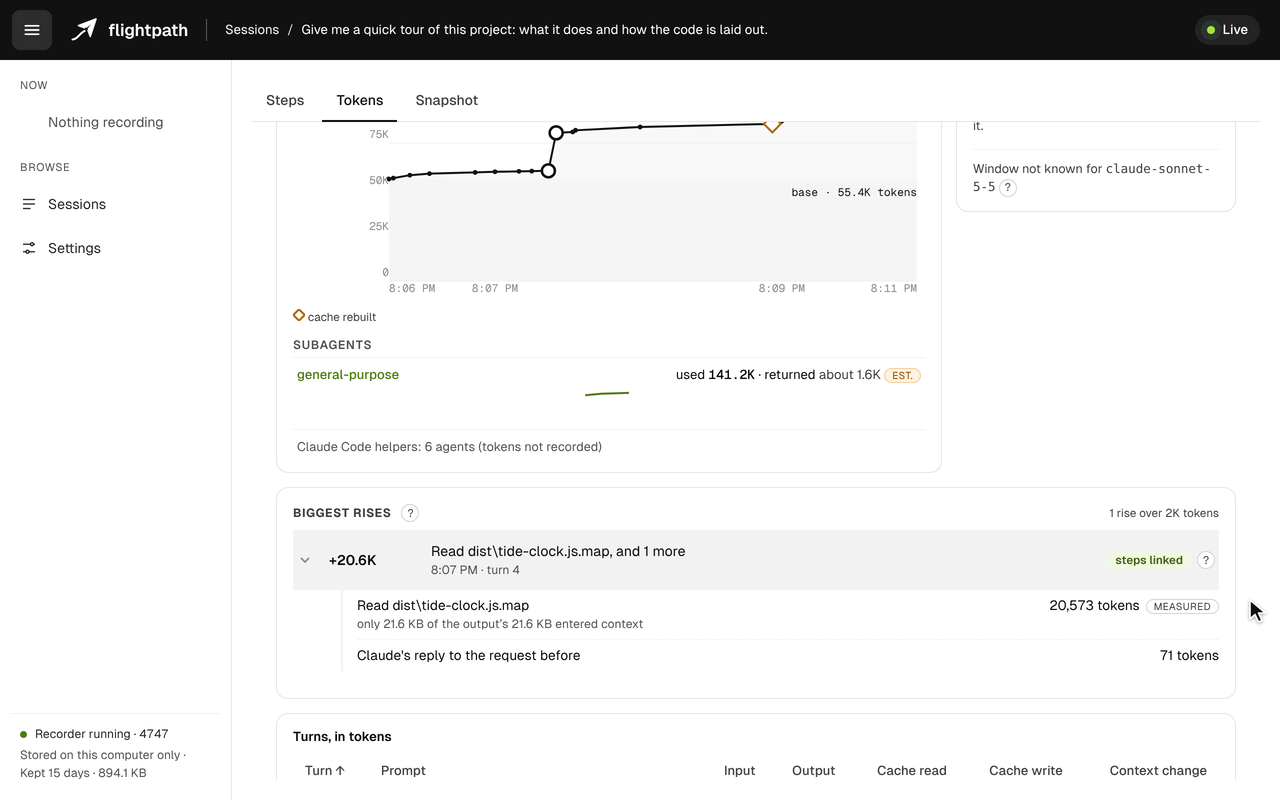
One read, 20,573 tokens: the biggest rise of the session, opened up to show what caused it.
None of these is a bug. All three are worth knowing about, and none of them shows in the terminal while it happens.
What makes the context jump
In our experience the big rises come from a few places:
- Large file reads. Generated and vendored files are the usual suspects: source maps, minified bundles, lockfiles,
node_modules,dist. - Command output. A test run or a build log can be large.
- Subagent reports. A subagent works on its own budget and hands back a summary, which is the point. In our session, the subagent used 141.2K tokens and returned about 1.6K to the main conversation.
- Cache rewrites. Not a rise in the context itself, but a cost: when the cache can't be reused, the whole conversation is written to it again.
Five habits that keep the context lean
1. Deny reads of folders that are rarely worth it. If Claude never needs to read node_modules, dist or lockfiles, say so in your Claude Code settings:
{
  "permissions": {
    "deny": [
      "Read(**/node_modules/**)",
      "Read(**/dist/**)"
    ]
  }
}
A Read deny rule also blocks edits and writes in those places, so only add what you really don't want Claude touching.
2. Keep always-loaded instructions short. Every line of every CLAUDE.md is sent with every request. If a section is only needed for one kind of task, move it into a skill, which loads only when it's used.
3. Turn off skills you don't use. Each available skill's description is listed on every request. In Claude Code, /skill-doctor shows each skill's cost and use.
4. Pick the model, the effort level and your MCP servers before the first message. Changing any of them mid-session can mean the cache can't be reused, and the conversation is written again.
5. Compact before a long break. Claude Code's cache expires after a while. If you step away and come back, the next message writes the whole conversation again. Running /compact first makes that much smaller, and starting a fresh session is better still if you're done with the work.
Seeing it while it happens
We built Flightpath because we wanted these answers live, not after the fact. It's a free, open-source Claude Code plugin that draws your session in the browser as it runs.

A thirty-second tour: steps, a suggestion, the context over time, and what Claude was carrying.
- Steps: every turn, tool call and subagent, with what each added to the context.
- Tokens: the context over time, the room left before auto-compact, and the biggest rises, each opened up to show what made it.
- Snapshot: what Claude had in context at any step, piece by piece, including the fixed cost of every request.
And a coach that reviews the session as it runs. In our seven-minute session it raised four suggestions, each tied to the step that prompted it:
- the model switch
- the long CLAUDE.md
- reads of the build folder that a deny rule would skip, with the rule ready to copy
- skills that were listed but never used
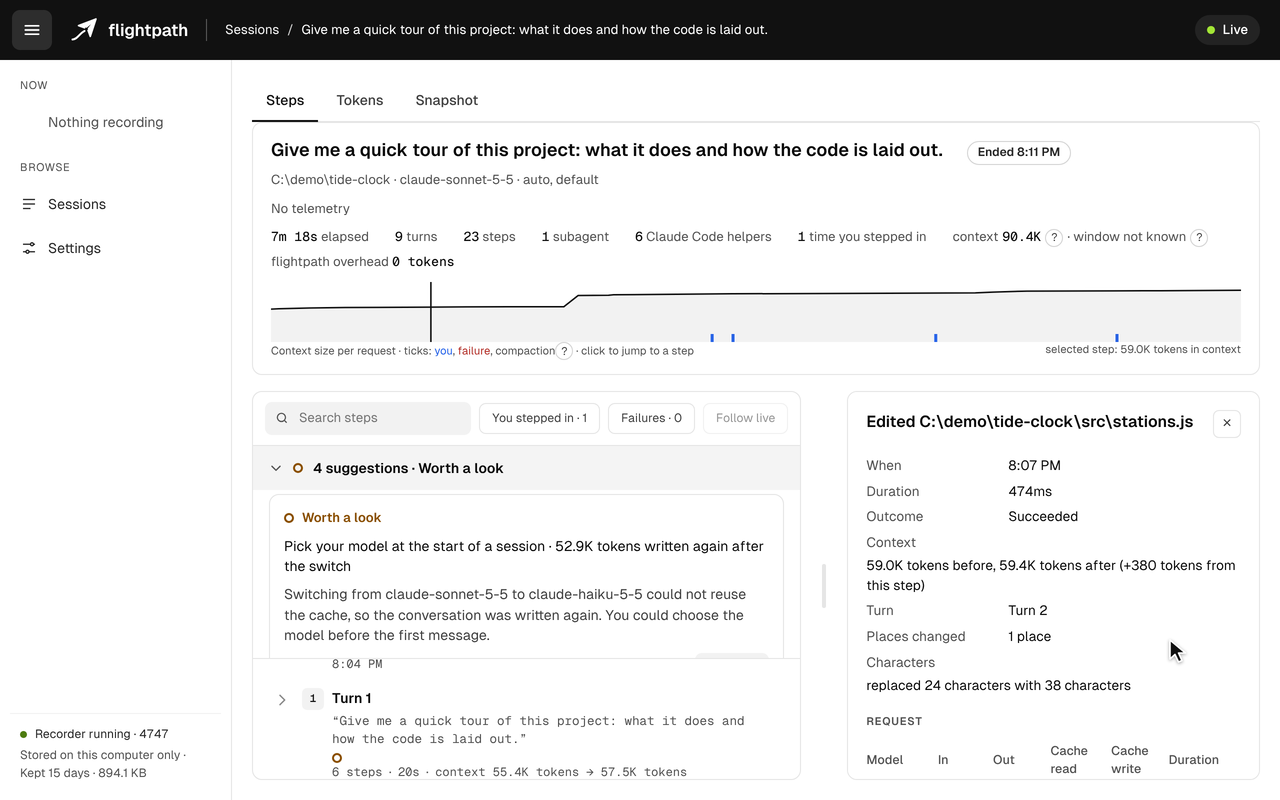
The model-switch suggestion, next to the step it came from.
Each one says why it matters and links to Claude Code's documentation.
Flightpath adds no tokens of its own: it records through Claude Code's hooks and answers its own commands on your machine, so nothing it does reaches the model. Everything stays local, and it keeps file paths, never file contents.
Try it
You need Node 24 or later. Then, inside Claude Code:
/plugin marketplace add dk-labs-dev/flightpath
/plugin install flightpath@flightpath
Your next session records automatically. Type /flightpath:open to watch it.
The source is on GitHub under Apache 2.0: https://github.com/dk-labs-dev/flightpath. If it shows you something unexpected about your own sessions, we'd like to hear about it. And if it's useful, a star helps other Claude Code users find it.
Comments
Join the discussionThe 55K tokens before the first real work landed is the number that surprised me most. A one line prompt should feel light, yet the system prompt, tool definitions, and instruction files are already a fixed cost. The source map example makes it concrete too. One reasonable read adding 20,573 tokens shows why the deny rule for build folders is worth setting up first, not after a session gets heavy.
Thanks for reading. That fixed cost surprised us too: it's there before you type a word, and nothing tells you unless you run /context. The build-folder read is the kind of thing Flightpath's coach looks for. When Claude reads from build output or dependencies, it suggests a deny rule you can copy into your settings, so the next session skips them.